How it works
From the first message to the paid job, at a roofing company of three.
Where it goes wrong today
If you run the business
- The firm’s WhatsApps sit in four phones and you can see one of them. You do not know who is still waiting for a reply.
- Every business WhatsApp is in one list, with the name of the colleague who has it.
- Your best salesperson leaves and the customer conversations leave with them.
- Conversations on a connected number stay with your company. A colleague carries on from the last message.
- You sent fifty quotes and cannot say which ones went quiet.
- You type "got a quote and then went quiet" and get the list.
- Next week is empty and there are nine hundred old customers in your phone.
- You send one message to the customers who said yes to that, and see what it brings in.
If you lead a team
- Two colleagues give the same customer two different answers.
- Everyone sees the whole conversation and who has it.
- Someone is off sick and nobody can get at their WhatsApps.
- You move their conversations to a colleague. You do not need their phone for that.
- You hear about a complaint when the customer rings.
- A message with "complaint" or "broken" goes straight to the person who handles complaints.
- Every morning you ask who is doing what.
- New messages are assigned by your rules. You look at what is left.
How it fits together
WhatsApp Business, as you have it now, on iPhone or Android.
The same conversations on the computer, for your whole team, with an assistant and campaigns.
Sees one number: yours. The inbox behind it does not show.
It stays in sync
Reply on your phone and the office sees it. When the office replies, it is in the same chat on your phone.
Six months back
When you connect, you choose whether the chats of the last six months come along.
Private stays yours
You tick who is private. Messages from those people are never stored. You can add someone later with one click, and everything from that person disappears.
Why this runs through Meta
WhatsApp belongs to Meta. A company may use WhatsApp with several people only through Meta. Tools that get around that log in with a WhatsApp Web QR code, and companies lose their number over it.
And if you have no Meta account
You create a free one in five minutes. We can do it with you: we call, you share your screen and you become the owner. Nobody needs to be able to find you on Facebook.
An ordinary Tuesday
A made-up roofing firm in Dublin. Dan owns it, Tom runs the office, Priya plans the jobs. This is one WhatsApp on its way through their day.
Routing follows your rules
Rules work on words, new or known customers, time of day, or in turn. You set them once. Whoever already helps a customer keeps that customer.
No reply within 24 hours?
Then it depends on where you write. From your phone it is free, as always. From the inbox you pay for that one first message, about 4 cents, and you pick a text Meta has already approved. Once your customer replies you type freely again. That rule is WhatsApp’s and applies to every company. A quick reply is nicer for your customer and costs you nothing.
What does replying cost?
Within 24 hours, the first 1,000 messages per number per month are free. After that you pay about 4 cents per message you send. What your customer sends is free, and so is everything from your phone. A marketing message costs about 13 cents. Those are Meta’s rates for Dutch numbers. To an Irish number a reply costs about 1.4 cents and a marketing message about 5 cents. The app shows where you stand.
What you promised this customer, next to the chat
A customer writes "that gutter again" and you have no idea which gutter. Open the file beside the conversation and you see who it is, what was done and what you promised. Your own AI writes the summary, lists what is still open and updates it after each conversation, if you turn that on.
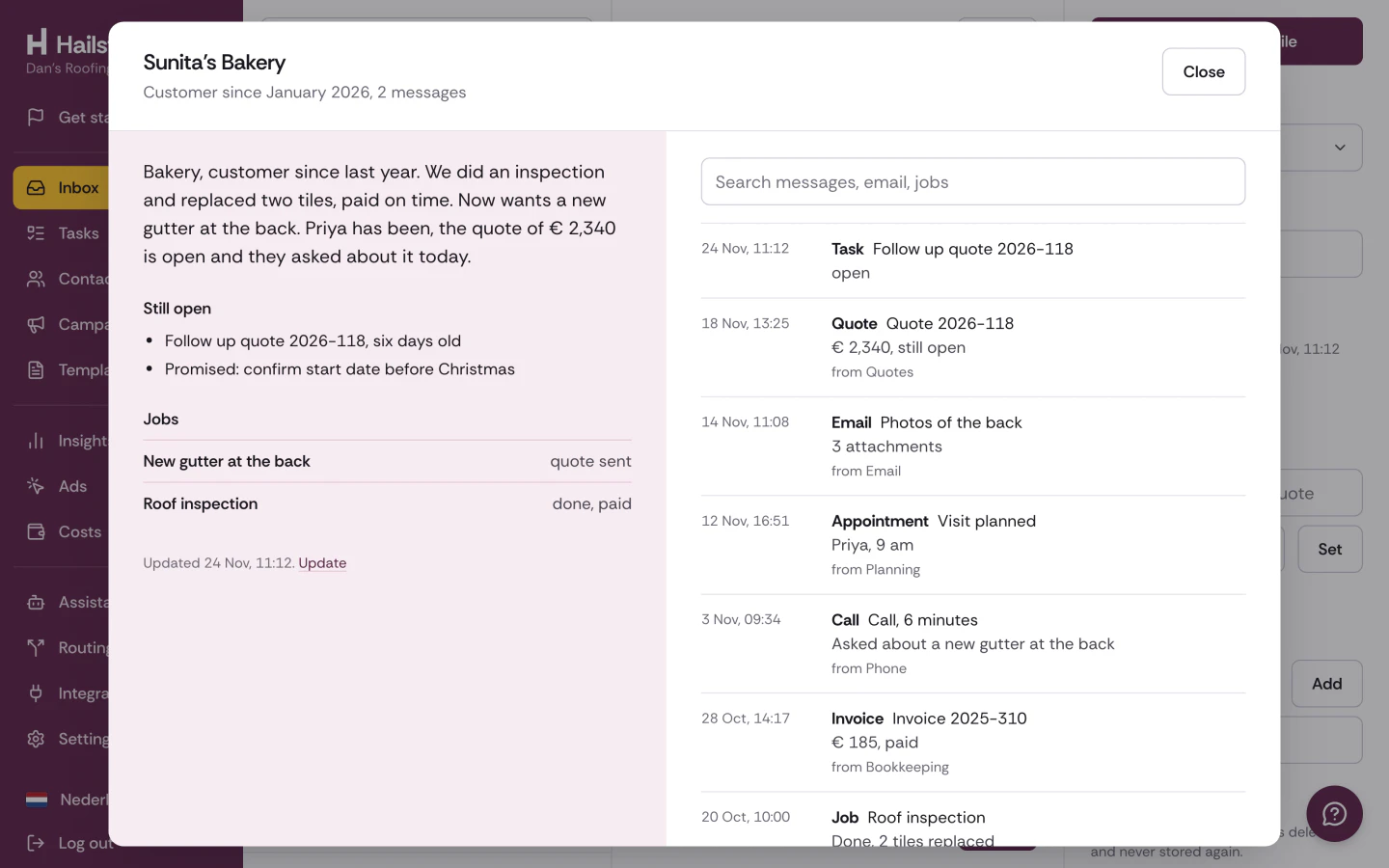
| What is in it | How | Good to know |
|---|---|---|
| WhatsApps, photos, campaigns, revenue, tasks and notes | Included | From the day you connect, plus six months back |
| A summary and what is still open | Included, on your own AI | Updated after each conversation if you turn that on |
| Jobs, quotes and invoices from your CRM or bookkeeping | With an integration | Matched on phone number |
| With an integration | Matched on the email address your customer mentions in a WhatsApp | |
| Calls | With an integration to your phone system | Who called, when and for how long |
See in minutes what you are missing
Hailstead reads your conversations and gives you five points at most, on how you work, your service or your sales. Each point says how many conversations it came up in and what you can do about it this week. It runs again every week, if you like.
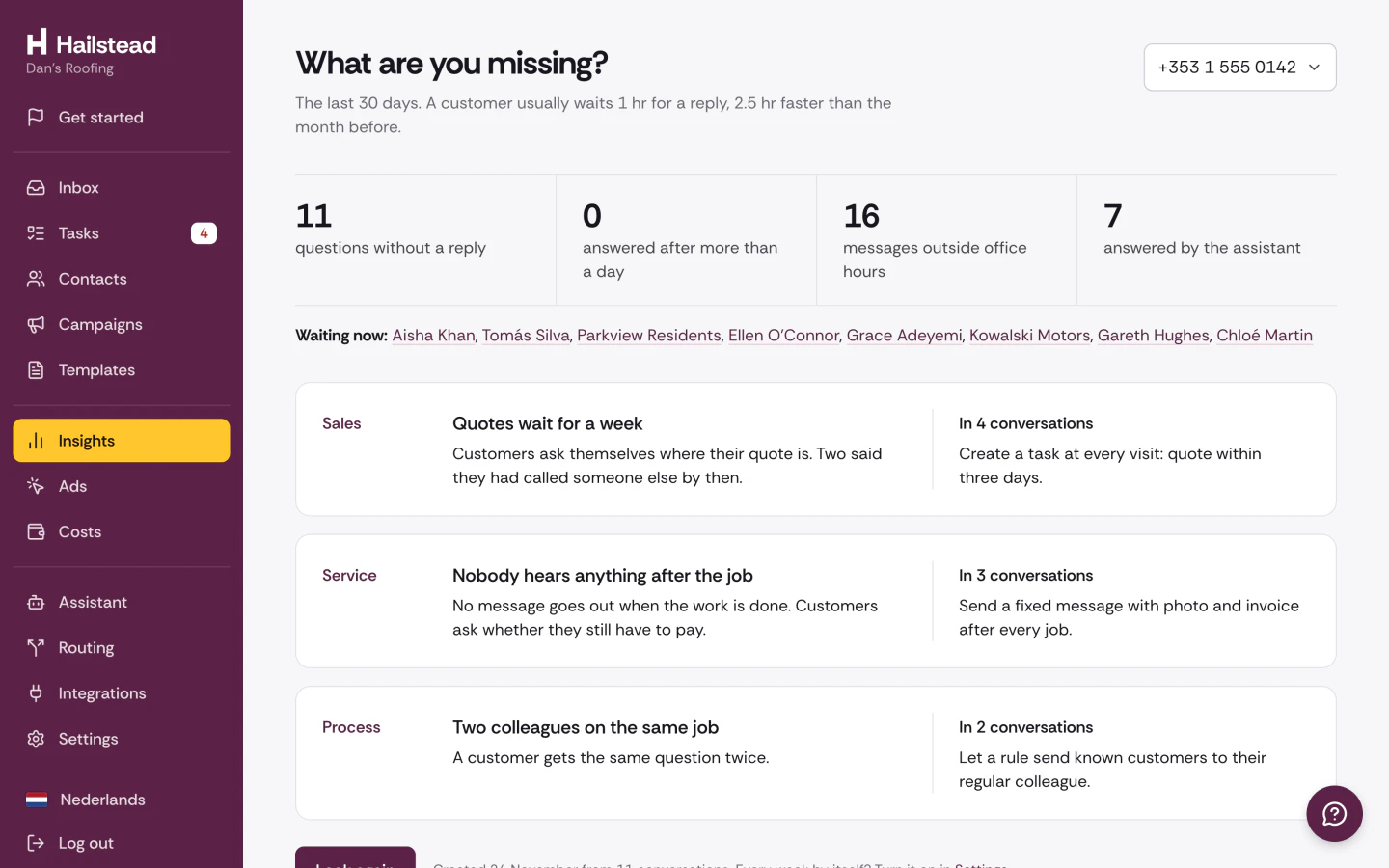
Ask it something
"What do customers complain about?" "Why did people drop out after a quote?" You get an answer with numbers.
Questions that keep coming back
You see them with the answer your team gives. One click and the assistant gives that answer from now on.
The helper, bottom right
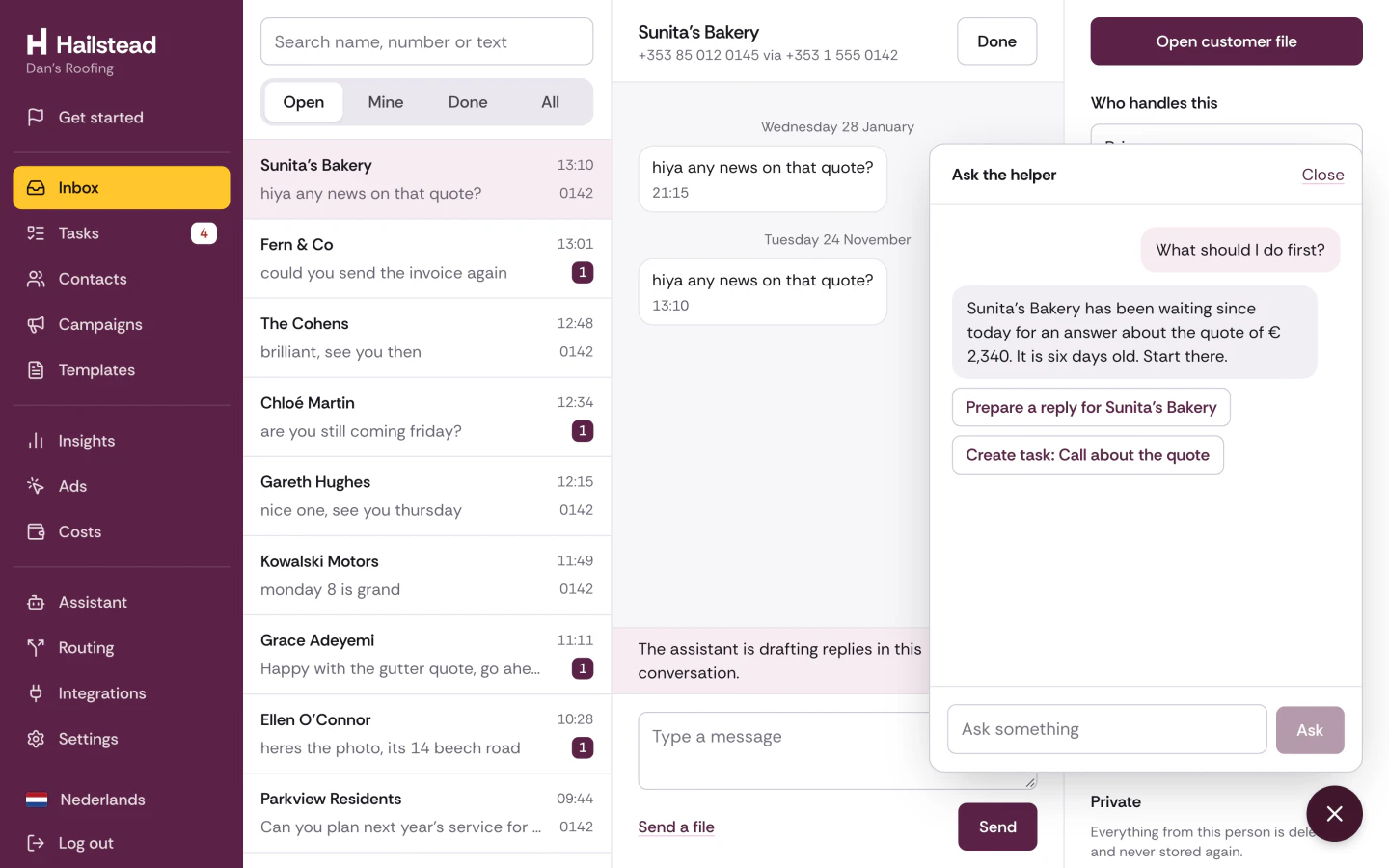
It is on every screen. Ask "Who has waited longest?", "Summarise this conversation" or "Prepare a reply". It never sends anything itself.
What runs by itself, and what it costs
| What | How | Cost |
|---|---|---|
| Getting a message to the right colleague | By your own rules | Nothing extra |
| A label on a customer | On words you choose | Nothing extra |
| Who has gone quiet | The app keeps track | Nothing extra |
| Sending a campaign once it is approved | As soon as Meta says yes | Meta, per message |
| Handling STOP | At once, for all your numbers | Nothing extra |
| The assistant’s replies | From what you wrote down | Your own AI bill: about $ 0.50 to $ 19 per 1,000 replies, depending on the model |
| Finding a group in your own words | Once, or every week | Your own AI bill |
| Questions about your conversations and the improvement list | Once, or every week | Your own AI bill |
| Updating the customer file | After a conversation, if you turn it on | Your own AI bill |
| Tasks and alerts | At once | Nothing extra |
| The helper: who is waiting, tasks, how it works | At once | Nothing extra. Summaries and writing use your own AI |
You choose the AI: OpenAI (ChatGPT), Anthropic (Claude), Google (Gemini) or Mistral. You open an account with them, enter your key in Hailstead and pay them directly.
Connect your CRM
With an integration, your other system takes part in the conversation. These are things we built at other companies:
| What | What it looks like | What you gain |
|---|---|---|
| Customer in view | The job, repair or order sits next to the WhatsApp | Your team does not have to search |
| Automatic message | Appointment confirmed, reminder, repair ready, payment link, instalment overdue | Fewer calls and fewer missed appointments |
| Quick on a request | Someone fills in your form and gets a WhatsApp within minutes | You are the first to respond |
| From message to work | A message with a photo becomes a proposed job or task | Nothing to retype |
| Follow up | Not delivered, or quiet for three days, becomes a task for a colleague | No customer is forgotten |
| Revenue back | A paid invoice counts towards the campaign | You know which campaign worked |
If we build it, it starts with half an hour on the phone. Within two working days you get a description in plain words and a fixed price. We test it together and you get a month of aftercare.
Rules and terms
What is Hailstead?
Hailstead is a shared inbox for WhatsApp Business. A company keeps its own number and phone, and colleagues answer the same customers from their computers. With routing rules, tasks, campaigns to customers who said yes and a digital assistant on your own AI. From 69 euro per number per month, for as many colleagues as you like.
Does it work with my private number?
The number has to be in the WhatsApp Business app. Regular WhatsApp does not work. You can move your current number to the Business app and your chats come along. Then you mark who is private, and those people never enter the inbox.
Does anything change on my phone?
You keep messaging, calling and using groups as you do now. What you send from your phone also shows in the inbox, and the other way round.
Do my old chats come along?
If you choose so when connecting: yes, the last six months. If you choose no, the inbox starts empty.
What happens to my contacts?
The contacts of your business WhatsApp come along when you connect. Add an Excel list as a file. For each person we keep the number, name, labels and whether they said yes or no to marketing. Everything is stored in Amsterdam, for your company only. You can download it, and we delete it 30 days after you stop.
How does a colleague get access?
You enter a name and email address and get a link to pass on. Your colleague logs in with a code we email them, plus a code from an authenticator app on their phone. You tick which numbers they see. When they leave, you turn off the account and they are logged out everywhere.
Can I use Hailstead in Dutch or English?
Yes. Everyone picks Dutch or English at the bottom of the menu. The assistant replies in your customer’s language.
Can I choose my own colours?
Yes. Five colours, or the colour of your own brand. For your whole team.
Can I call and use groups from the inbox?
Not yet. Groups and calls stay on your phone. In an inbox, Meta only allows them for numbers outside the Business app.
Where is it not allowed?
Meta does not deliver marketing to numbers in the United States. Nothing can be sent to Cuba, Iran, North Korea, Syria, Crimea, Donetsk and Luhansk. Not allowed are, among others, weapons, alcohol, tobacco, medicines, gambling, dating, crypto, payday loans, debt collection and political parties.
How late and how often may I send?
You decide. We set it to 8:00 to 21:00 and one campaign per person per day. If you want more, the app shows the risk and you confirm it. When many people block you, Meta holds your messages back for days or weeks, or closes your account.
Who is responsible?
You are, for what your team and your assistant write and for the consent of the people you message. Before the assistant may reply by itself, the owner confirms that. We are, for a service that works as described here. We stop your campaigns at once when Meta limits your account. We are not liable for a block by Meta.
See it on your own number
Book twenty minutes with Stefan and see your own chats in Hailstead.